Step 7. Configure the panel
Open the "SETTINGS" tab.
Essentials only
Below is the minimum configuration required to start farming. Everything else you can tune to taste - see the Features section.
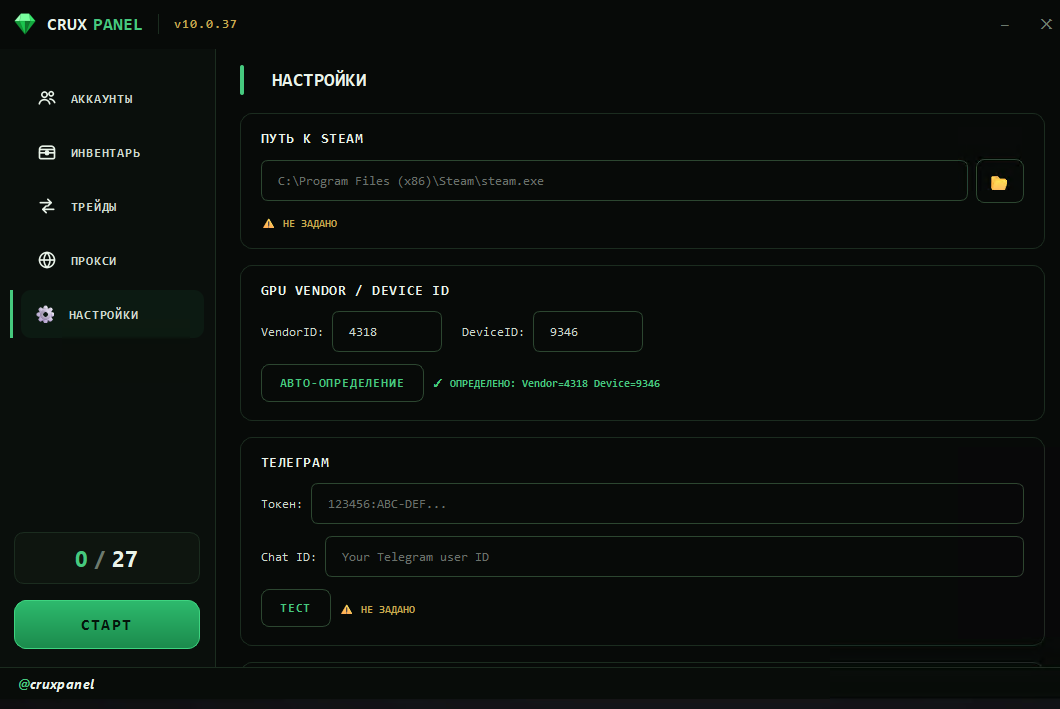
1. Steam path
Set the path to steam.exe on the virtual machine.
2. VendorID and DeviceID
These fields are filled in automatically when the panel starts.
- If they're empty - press "AUTO-DETECT".
- If it errors again - make sure the GPU is visible in
devmgmt.msc→ Display adapters. If it isn't, go back to Step 4: GPU passthrough.
3. Telegram (optional but handy)
Connecting Telegram gives you action logging, control of the VM and panel from chat, and drop notifications.
- Bot token - create your own bot via
/newbotin @BotFather and copy the token. - Chat ID - open @CruxPanels_bot, send
/start, and find the ID: line in the main menu - that's your Chat ID.
Ready to farm
The panel is configured. You can start farming. If something goes wrong, check Common problems.
What next
- If you run several virtual machines and disk space is tight, see Step 8: one CS2 for all VMs. The step is optional.
- Every tab and option of the panel is covered in Features.